by Marco Paland, October 3, 2026
The Moon on Your Wrist: Building a Moon Phase Watch Face
Build an exact moon phase watch face for Wear OS and widgets with the Lunar Provider.
Long before people cared about minutes, they cared about the moon. The lunar cycle told farmers when to sow, fishermen when to expect spring tides and travellers whether the night would be bright enough to walk home.
It is no surprise that the moonphase is one of the oldest and most loved watch complications. And it is still one of the most beautiful things you can put on a dial.
In this post we look at how watchmakers brought the moon to the wrist and then build our own moon phase face with tyckr. Ours is exact and never needs correcting.
A Short History of the Moonphase
The moon needs about 29 days, 12 hours and 44 minutes to go from one new moon to the next. This period is called a synodic month or lunation.
Astronomical clocks displayed it centuries before wristwatches existed. The famous Prague Orloj, first installed in 1410, shows the moon’s phase with a half-silvered sphere that slowly turns as the moon waxes and wanes.
When the complication moved into pocket watches and later wristwatches, watchmakers needed a mechanical trick. They found an elegant one: a disc with two painted moons and 59 teeth, advanced by one tooth every day. Two lunations of 29.5 days make 59 days, so each moon crosses the little aperture in exactly one "mechanical" lunation.
The catch is that the real lunation is about 44 minutes longer than 29.5 days. The classic 59-tooth moonphase drifts by a full day roughly every 2.7 years and has to be corrected by hand with a pusher or the crown.
High-end manufactures pushed this further with 135-tooth wheels and extra gear trains, building moonphases that stay accurate for 122 years or more. That is impressive, but it is still an approximation in brass and steel.
A smartwatch has an advantage here: it doesn’t need to approximate. It can simply calculate where the moon is.
Behind the Scenes
The tyckr Lunar Provider calculates the moon phase for any date and timezone using the astronomical algorithms of Jean Meeus, the same reference we use for the high-precision prayer times in our Qibla Finder.
For the current lunation it returns:
-
The date and time of New Moon, First Quarter, Full Moon, Third Quarter and the Next New Moon
-
The Phase as Percentage, where
0is new moon,25first quarter,50full moon and75last quarter -
An Icon name for the current phase, from
moon_newovermoon_waxing_gibboustomoon_waning_crescent -
Is Waxing, which is
1from new to full moon and0from full to new moon -
The Lunation Number, counted since Ernest W. Brown’s first lunation, which started with the new moon of January 17, 1923
A nice detail is the Result Timezone. Your watch can show the moon phase times for your home town while you are travelling, or the other way round.
Building the Face
A good moon phase face is calm and easy to read. This is what we are going to build:
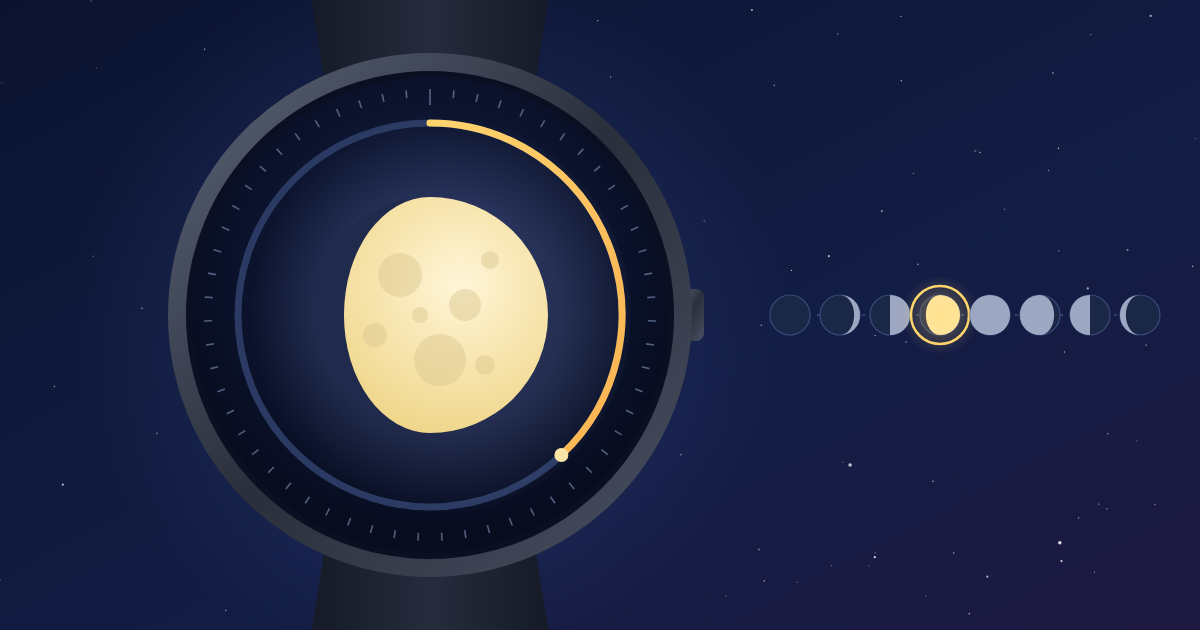
We use four building blocks:
-
The Moon
Add an Icon Facelet and bind its Icon field to the Lunar Provider’sIconquery. The icon library already contains all eight phase symbols, so the moon updates on its own, every day, forever. Give it a soft silver or warm yellow color so it glows on a dark background. -
The Lunation Ring
A Pie Facelet with an inner diameter greater than0becomes a thin ring. Bind the end angle of a sweep segment to the phase percentage and multiply it by3.6with a value expression to convert 0–100 % into 0–360°. The ring fills up as the lunation progresses and starts again at each new moon. This is our digital version of the rotating moon disc. -
Waxing or Waning
Use the Is Waxing value as a visibility condition for two smallarrow_upandarrow_downicons. You can read at a glance whether the nights are getting brighter or darker. -
Countdown to the Full Moon
Feed the Lunar Provider’s Full Moon time into a Duration Provider as Destination Time. A Text Facelet with the patternd’d 'HH’h'then shows how long until the next full moon. Switch to Next New Moon after the full moon has passed, and dark-sky photographers know exactly when the best night is coming.
As always, bind the Lunar Provider’s date to the Time Provider so all calculations use the same clock as the rest of the face.
Want more? Combine it with the Solar Provider to show sunrise and sunset next to the moon, similar to our 24-Hour Clock, and you have a complete sun and moon dial.
A Full Moon for Christmas
Here is a nice reason to build this face now. The next full moon rises on October 26, followed by November 24, and the last one of the year falls on Christmas Eve, December 24, 2026. That leaves plenty of time to fine-tune your face before the holidays.
If the sky is clear, your face will show a full moon at exactly the right moment for a winter walk after dinner. No pusher needed.
Further Ideas
-
Beach walkers and anglers: add the Marine Provider from Core 4.1.0. Spring tides follow new and full moons, so moon phase and tidal times make a perfect pair.
-
Gardeners: show the days until the next new moon if you plant by the lunar calendar.
-
Photographers: hide everything except the countdown to the next new moon for the darkest skies.
-
Widgets: the same face works as an Android home screen widget, so the moon is on your phone as well.
Happy tyckring!