<?xml version="1.0" encoding="utf-8" standalone="yes"?>
<feed xmlns="http://www.w3.org/2005/Atom">
  
  <id>https://www.tyckr.io/</id>
  
  <link rel="self" type="application/atom+xml" href="https://www.tyckr.io/feed.xml" hreflang="en-US"/>
  
  
  <link rel="alternate" type="text/html" href="https://www.tyckr.io/" hreflang="en-US"/>
  
  <icon>https://www.tyckr.io/tyckr-logo-32x32.png</icon>
  <logo>https://www.tyckr.io/tyckr-logo-32x32.png</logo>
  
  <subtitle>The official blog of tyckr</subtitle>
  <title>tyckr Blog</title>
  <updated>2026-02-08T02:16:36+01:00</updated>
  
  <entry>
    
    <author>
      <name>Marco Paland</name>
    </author>
    
    <id>tag:www.tyckr.io,2025:/blog/2025-12-29-release-core-4.3.0/</id>
    <link rel="alternate" href="https://www.tyckr.io/blog/2025-12-29-release-core-4.3.0/"/>
    <title>Core 4.3.0 released</title>
    <published>2025-12-29T00:00:00+00:00</published>
    <updated>2025-12-29T00:00:00+00:00</updated>
    <summary type="text">Core 4.3.0 changes the tick format, a few config parameters and fixes some minor bugs.</summary>
    <content type="html" xml:base="https://www.tyckr.io/" xml:lang="en">
      <![CDATA[<div class="paragraph">
<p>Core <code>4.3.0</code> changes the Tick range format for future compatibility. The old range format was <code>start-end@step</code>, this is changed to <code>start..end@step</code> in favour to support negative values. You need to update your face configurations accordingly.<br/>
The REST API provider supports dynmamic URL parameters now, allowing you to use variables in the URL like actual GPS coordinates.<br/>
The Pie Chart Facelet got dynamic diameter values. You need to update your face configurations which use the Pie Facelet accordingly.<br/>
Additionally, we have fixed some minor bugs and made a few improvements.<br/></p>
</div>
<div class="paragraph">
<p><br/></p>
</div>
<div class="paragraph">
<p>The latest version <code>1.3.0</code> of the Wear OS app is now available in the <a href="https://play.google.com/store/apps/details?id=com.paland.app.tyckr">Google Play Store</a>.<br/>
The latest version <code>3.3.1</code> of the widget is now available in the <a href="https://play.google.com/store/apps/details?id=com.paland.widget.tyckr">Google Play Store</a> or via direct <a href="/download/">APK download</a>.<br/>
The latest version <code>4.3.0</code> of the watchface is now available in the <a href="https://play.google.com/store/apps/details?id=com.paland.watchface.tyckr">Google Play Store</a> or via direct <a href="/download/">APK download</a>.<br/></p>
</div>
<div class="paragraph">
<p>To use the new features, please make sure to update the tyckr editor to version <code>2.4.0</code> or higher.<br/>
<br/></p>
</div>
<div class="paragraph">
<p>We hope you enjoy the new features and improvements in this release.<br/>
As always, we appreciate your feedback and suggestions for future improvements.<br/>
Happy tyckring!<br/></p>
</div>
]]>
    </content>
  </entry>
  
  <entry>
    
    <author>
      <name>Marco Paland</name>
    </author>
    
    <id>tag:www.tyckr.io,2025:/blog/2025-10-26-halloween-campain/</id>
    <link rel="alternate" href="https://www.tyckr.io/blog/2025-10-26-halloween-campain/"/>
    <title>🎃 Special Halloween Deal</title>
    <published>2025-10-26T00:00:00+00:00</published>
    <updated>2025-10-26T00:00:00+00:00</updated>
    <summary type="text">Halloween 2025: Grab your tyckr license with a limited‑time treat until Nov 7th.</summary>
    <content type="html" xml:base="https://www.tyckr.io/" xml:lang="en">
      <![CDATA[<div class="paragraph">
<p>No tricks here — just a small treat for Halloween 2025.<br/>
If you don’t have a tyckr.io license yet, now’s the perfect time:<br/>
<br/>
👉 Save <strong>$1.50</strong> on your license purchase until <strong>November 7th, 2025</strong>.<br/>
<br/></p>
</div>
<div class="paragraph">
<p>It’s a simple, one-time license, no subscriptions, no hidden costs. Just <a href="/pricing/">grab your license</a>, unlock tyckr.io, and enjoy.<br/></p>
</div>
<div class="paragraph">
<p>But hurry: When the clock strikes midnight on November 7th, this offer disappears into the night and all spooky savings vanish!<br/></p>
</div>
<div class="paragraph">
<p>🎃 Happy Halloween and Happy Tyckring!</p>
</div>
]]>
    </content>
  </entry>
  
  <entry>
    
    <author>
      <name>Marco Paland</name>
    </author>
    
    <id>tag:www.tyckr.io,2025:/blog/2025-10-25-release-core-4.2.0/</id>
    <link rel="alternate" href="https://www.tyckr.io/blog/2025-10-25-release-core-4.2.0/"/>
    <title>Core 4.2.0 released</title>
    <published>2025-10-25T00:00:00+00:00</published>
    <updated>2025-10-25T00:00:00+00:00</updated>
    <summary type="text">The Core 4.2.0 release brings a lot of new cool features, stability improvements and many bug fixes.</summary>
    <content type="html" xml:base="https://www.tyckr.io/" xml:lang="en">
      <![CDATA[<div class="paragraph">
<p>Core <code>4.2.0</code> is a full packed feature release with a lot of cool new things, improvements and bug fixes to the tyckr watchface, widget and app ecosystem.<br/>
So, let’s have a look at the highlights of this release:<br/>
<br/></p>
</div>
<div class="sect1">
<h2 id="_pollen_data_support">Pollen Data Support</h2>
<div class="sectionbody">
<div class="paragraph">
<p>In the last Core <code>4.1.0</code> feature update we added air quality indexes (AQI) and ozone values to the Weather Provider.<br/>
Now we have added support for pollen data, allowing users suffering from allergies to monitor pollen levels directly on their watchface and widget. This feature is especially useful to plan and monitor outdoor activities accordingly.<br/>
Supported pollen types are Hazel, Alder, Birch, Oak, Grass, Mugwort and Ragweed.<br/>
Pollen data is provided as current value and as time series formatted data, which can be easily integrated into various Facelets like the Heatmap for visualization.</p>
</div>
</div>
</div>
<div class="sect1">
<h2 id="_drift_correction_for_the_time_provider">Drift Correction for the Time Provider</h2>
<div class="sectionbody">
<div class="paragraph">
<p>We completely refactored and improved the SNTP and GPS time synchronization logic of the Time Provider.<br/>
Tablets and low cost watches often have less accurate system clocks that tend to drift over time, especially during sleep or doze mode.<br/>
Our new drift correction unit automatically measures and adjusts the time based on periodic synchronizations with the system time. This ensures that the displayed time remains accurate over extended periods without GPS or network coverage.</p>
</div>
</div>
</div>
<div class="sect1">
<h2 id="_barometer_altitude">Barometer Altitude</h2>
<div class="sectionbody">
<div class="paragraph">
<p>The pressure sensor data of the Environment Provider can now be utilized to calculate and display altitude information. This feature is particularly beneficial, if no GPS reception is available.<br/>
tyckr uses the <a href="https://en.wikipedia.org/wiki/Pressure_altitude">pressure to altitude formula</a> published by the National Oceanic and Atmospheric Administration (NOAA) for conversion.</p>
</div>
</div>
</div>
<div class="sect1">
<h2 id="_additional_gps_provider_data">Additional GPS Provider Data</h2>
<div class="sectionbody">
<div class="paragraph">
<p>We have expanded the GPS data support to include additional information such as the count of receiving GPS, Glonass and Galileo satellites.<br/>
Furthermore, we now provide the SNR (Signal to Noise Ratio) values for the received satellites as time series formatted data to be visualized in Facelets like the TimeSeries or Heatmap.<br/>
This data can be used to analyze the quality of the GPS signal reception.</p>
</div>
</div>
</div>
<div class="sect1">
<h2 id="_general_improvements_and_bug_fixes">General Improvements and Bug Fixes</h2>
<div class="sectionbody">
<div class="ulist">
<ul>
<li>
<p>Improved the time span handling of the TimeSeries and Heatmap Facelet.</p>
</li>
<li>
<p>Fixed an issue where the widget could crash on startup under specific conditions.</p>
</li>
<li>
<p>Update the ongoing status correctly in the tyckr app on a watch.</p>
</li>
<li>
<p>Several other minor bug fixes and stability improvements.</p>
</li>
</ul>
</div>
<div class="paragraph">
<p>The latest version <code>1.2.0</code> of the Wear OS app is now available in the <a href="https://play.google.com/store/apps/details?id=com.paland.app.tyckr">Google Play Store</a>.<br/>
The latest version <code>3.2.0</code> of the widget is now available in the <a href="https://play.google.com/store/apps/details?id=com.paland.widget.tyckr">Google Play Store</a> or via direct <a href="/download/">APK download</a>.<br/>
The latest version <code>4.2.0</code> of the watchface is now available in the <a href="https://play.google.com/store/apps/details?id=com.paland.watchface.tyckr">Google Play Store</a> or via direct <a href="/download/">APK download</a>.<br/></p>
</div>
<div class="paragraph">
<p>To use the new features, please make sure to update the tyckr editor to version <code>2.3.0</code> or higher.<br/>
<br/></p>
</div>
<div class="paragraph">
<p>We hope you enjoy the new features and improvements in this release.<br/>
As always, we appreciate your feedback and suggestions for future improvements.<br/>
Happy tyckring!<br/></p>
</div>
</div>
</div>
]]>
    </content>
  </entry>
  
  <entry>
    
    <author>
      <name>Marco Paland</name>
    </author>
    
    <id>tag:www.tyckr.io,2025:/blog/2025-08-30-release-core-4.1.2/</id>
    <link rel="alternate" href="https://www.tyckr.io/blog/2025-08-30-release-core-4.1.2/"/>
    <title>Core 4.1.2 released</title>
    <published>2025-08-30T00:00:00+00:00</published>
    <updated>2025-08-30T00:00:00+00:00</updated>
    <summary type="text">The release of Core 4.1.2 brings stability improvements and some minor bug fixes.</summary>
    <content type="html" xml:base="https://www.tyckr.io/" xml:lang="en">
      <![CDATA[<div class="paragraph">
<p>This release is mainly focused on improving performance and stability and some minor bug fixes:</p>
</div>
<div class="ulist">
<ul>
<li>
<p>We fixed a possible startup crash that could occur in certain rare cases.</p>
</li>
<li>
<p>Improved GPS stability with faster fixes and more reliable time sync.</p>
</li>
<li>
<p>Enhanced orientation sensor performance with more efficient updates.</p>
</li>
<li>
<p>Fixed Marine Data timeseries data issues.</p>
</li>
<li>
<p>Enhanced the power management of the Core for longer battery life.</p>
</li>
</ul>
</div>
<div class="paragraph">
<p>The latest version <code>4.1.5</code> of the watchface is now available in the <a href="https://play.google.com/store/apps/details?id=com.paland.watchface.tyckr">Google Play Store</a> or via direct <a href="/download/">APK download</a>.<br/>
The latest version <code>3.1.2</code> of the widget is now available in the <a href="https://play.google.com/store/apps/details?id=com.paland.widget.tyckr">Google Play Store</a> or via direct <a href="/download/">APK download</a>.<br/>
The latest version <code>1.1.2</code> of the Wear OS app is now available in the <a href="https://play.google.com/store/apps/details?id=com.paland.app.tyckr">Google Play Store</a>.</p>
</div>
]]>
    </content>
  </entry>
  
  <entry>
    
    <author>
      <name>Marco Paland</name>
    </author>
    
    <id>tag:www.tyckr.io,2025:/blog/2025-07-28-release-core-4.1.0/</id>
    <link rel="alternate" href="https://www.tyckr.io/blog/2025-07-28-release-core-4.1.0/"/>
    <title>Core 4.1.0 released</title>
    <published>2025-07-28T00:00:00+00:00</published>
    <updated>2025-07-28T00:00:00+00:00</updated>
    <summary type="text">The release of Core 4.1.0 includes several improvements, along with a new Marine Data Provider and a Heatmap Facelet.</summary>
    <content type="html" xml:base="https://www.tyckr.io/" xml:lang="en">
      <![CDATA[<div class="paragraph">
<p>This minor core release brings several improvements, bug fixes and a lot of cool new features.<br/></p>
</div>
<div class="paragraph">
<p>We enhanced the Professional Edition with a powerful new <strong>Marine Data Provider</strong>, offering real-time tidal information, water temperature, wave heights and swell conditions. This is especially useful for sailors, surfers, fishermen and your next beach holiday.<br/>
Exclusively developed for tideland walkers, the “Tidal Transition Time” pinpoints the exact moment when the tideland shifts between submerged and exposed states. No more surprises at the beach if the water is away.<br/></p>
</div>
<div class="paragraph">
<p>The Weather Provider has been enhanced with <strong>additional air quality indexes EPA and DEFRA and actual ozone values</strong>, important for outdoor activities.<br/>
We also added new weather alert icons for better visibility of severe weather conditions.<br/></p>
</div>
<div class="paragraph">
<p>A <strong>new Heatmap Facelet</strong> has been added to visualize time series data more effectively. This is a fully customizable data grid display like the contribution display of Github or in habit trackers. It’s a nice representation of hourly data like temperature, UV index, AQI etc.<br/></p>
</div>
<div class="paragraph">
<p>The font handling was improved for better readability.<br/>
We also added the German DIN1451 font for clear text display, providing a clean, precise and aircraft-inspired look.<br/></p>
</div>
<div class="paragraph">
<p>Several reported bugs have been fixed, including the video codec output issue, which lead to wrong colors on some watches like the OnePlus Watch 3 rendering a MPEG-4 stream.<br/></p>
</div>
<div class="paragraph">
<p>The latest version <code>4.1.2</code> of the watchface is now available in the <a href="https://play.google.com/store/apps/details?id=com.paland.watchface.tyckr">Google Play Store</a> or via direct <a href="/download/">APK download</a>.<br/>
The latest version <code>3.1.0</code> of the widget is now available in the <a href="https://play.google.com/store/apps/details?id=com.paland.widget.tyckr">Google Play Store</a> or via direct <a href="/download/">APK download</a>.<br/>
The latest version <code>1.0.8</code> of the Wear OS app is now available in the <a href="https://play.google.com/store/apps/details?id=com.paland.app.tyckr">Google Play Store</a>.</p>
</div>
]]>
    </content>
  </entry>
  
  <entry>
    
    <author>
      <name>Marco Paland</name>
    </author>
    
    <id>tag:www.tyckr.io,2025:/blog/2025-05-26-release-core-4/</id>
    <link rel="alternate" href="https://www.tyckr.io/blog/2025-05-26-release-core-4/"/>
    <title>The Release of Core 4</title>
    <published>2025-05-26T00:00:00+00:00</published>
    <updated>2025-05-26T00:00:00+00:00</updated>
    <summary type="text">Announcing the new Core 4 of the tyckr watch face and widget editor and designer platform, with major updates for WearOS 5 and WWF watch faces.</summary>
    <content type="html" xml:base="https://www.tyckr.io/" xml:lang="en">
      <![CDATA[<div class="paragraph">
<p>This is the release announcement for the new <code>Core 4</code> of the tyckr watch face and widget editor and designer platform.<br/>
The new core version is a major update to use tyckr with WearOS 5 and WWF watch faces as an App.<br/>
Our new WWF faces will be available in the next few weeks, so stay tuned!<br/>
A lot of work has been done to further improve battery performance and dynamic data updates.<br/>
We also added a new Complication Data Provider in form of a Facelet, which easily allows you to display any tyckr data (like stock infos, MQTT, REST API values etc.) in standard complication slots of any watch face when using the tyckr Wear OS App.<br/></p>
</div>
<div class="paragraph">
<p>The latest version of the watch face is now available in the <a href="https://play.google.com/store/apps/details?id=com.paland.watchface.tyckr">Google Play Store</a> or via direct <a href="/download/">APK download</a>.<br/>
The latest version of the widget is now available in the <a href="https://play.google.com/store/apps/details?id=com.paland.widget.tyckr">Google Play Store</a> or via direct <a href="/download/">APK download</a>.</p>
</div>
]]>
    </content>
  </entry>
  
  <entry>
    
    <author>
      <name>Marco Paland</name>
    </author>
    
    <id>tag:www.tyckr.io,2025:/blog/2025-04-04-release-watchface-3.12.0/</id>
    <link rel="alternate" href="https://www.tyckr.io/blog/2025-04-04-release-watchface-3.12.0/"/>
    <title>Watchface 3.12.0 and Widget 2.11.0 released</title>
    <published>2025-04-04T00:00:00+00:00</published>
    <updated>2025-04-04T00:00:00+00:00</updated>
    <summary type="text">Release of Watchface 3.12.0 / Widget 2.11.0 / Core 3.17.0</summary>
    <content type="html" xml:base="https://www.tyckr.io/" xml:lang="en">
      <![CDATA[<div class="paragraph">
<p>In this release we have primarily added <strong>Spanish and French language support</strong> for the UI. If you are a native speaker and notice any translations that seem unusual, please feel free to contact us.</p>
</div>
<div class="paragraph">
<p><span class="status-color-orange">Breaking:</span> The handling (and the internal format) of <strong>face constants</strong> has been updated and improved.<br/>
As a result, you will need to <strong>redefine any face constants</strong> of your faces, as there is no automatic conversion or upgrade process. Additionally, you can now use a provider output as a dynamic value - that’s not a constant in the traditional sense but it’s highly convenient. If you’re unfamiliar with face constants, you can learn more <a href="/help/value-expression/#constants">here</a>.<br/>
In essence, a face constant is a single, centralized value that can be utilized by any provider or facelet within the the face. This is particularly useful for defining shared settings like colors, dates, locations, etc.<br/></p>
</div>
<div class="paragraph">
<p>Of course, this release also includes bug fixes for reported issues.<br/></p>
</div>
<div class="paragraph">
<p>The latest version <code>3.12.0</code> of the watchface is now available in the <a href="https://play.google.com/store/apps/details?id=com.paland.watchface.tyckr">Google Play Store</a> or via direct <a href="/download/">APK download</a>.<br/>
The latest version <code>2.11.0</code> of the widget is now available in the <a href="https://play.google.com/store/apps/details?id=com.paland.widget.tyckr">Google Play Store</a> or via direct <a href="/download/">APK download</a>.</p>
</div>
]]>
    </content>
  </entry>
  
  <entry>
    
    <author>
      <name>Marco Paland</name>
    </author>
    
    <id>tag:www.tyckr.io,2025:/blog/2025-03-20-release-watchface-3.11.1/</id>
    <link rel="alternate" href="https://www.tyckr.io/blog/2025-03-20-release-watchface-3.11.1/"/>
    <title>Watchface 3.11.1 released</title>
    <published>2025-03-20T00:00:00+00:00</published>
    <updated>2025-03-20T00:00:00+00:00</updated>
    <summary type="text">Release of Watchface 3.11.0 / Core 3.16.0</summary>
    <content type="html" xml:base="https://www.tyckr.io/" xml:lang="en">
      <![CDATA[<div class="paragraph">
<p>So here we are, releasing a new watchface version with the legendary number <code>3.11</code>, bringing an updated core and some minor bug fixes.</p>
</div>
<div class="paragraph">
<p>This update contains mainly an updated core with the following changes:</p>
</div>
<div class="ulist">
<ul>
<li>
<p>Introduced obstruction angles for sunrise and sunset to the Solar Provider.<br/>
Obstruction angles account for terrain obstacles, adjusting the sunrise and sunset times — advancing the sunrise and delaying the sunset based on the landscape for a fixed location.</p>
</li>
<li>
<p>Added a gauge and a server icon</p>
</li>
<li>
<p>Enhanced the location privacy for weather API usage, the location coordinates are filtered by a 10 km range now</p>
</li>
<li>
<p>Added a privacy option to reduce the accuracy to the Location and GPS Provider</p>
</li>
<li>
<p>Fixed the hand fill color in the Clock Facelet</p>
</li>
<li>
<p>Use dynamic trigger/condition value in Notification Facelet and Timer Provider</p>
</li>
<li>
<p>Some minor bug fixes</p>
</li>
</ul>
</div>
<div class="paragraph">
<p>The latest version <code>3.11.1</code> of the watchface is now available in the <a href="https://play.google.com/store/apps/details?id=com.paland.watchface.tyckr">Google Play Store</a> or for direct APK <a href="/download/">download</a>.</p>
</div>
]]>
    </content>
  </entry>
  
  <entry>
    
    <author>
      <name>Marco Paland</name>
    </author>
    
    <id>tag:www.tyckr.io,2025:/blog/2025-03-10-release-watchface-3.10.0/</id>
    <link rel="alternate" href="https://www.tyckr.io/blog/2025-03-10-release-watchface-3.10.0/"/>
    <title>Watchface 3.10.0 released</title>
    <published>2025-03-10T00:00:00+00:00</published>
    <updated>2025-03-10T00:00:00+00:00</updated>
    <summary type="text">Release of Watchface 3.10.0 / Core 3.15.1</summary>
    <content type="html" xml:base="https://www.tyckr.io/" xml:lang="en">
      <![CDATA[<div class="paragraph">
<p>This update contains the following changes and updates:</p>
</div>
<div class="ulist">
<ul>
<li>
<p>Added a Launcher Icon which opens the Settings</p>
</li>
<li>
<p>Added an &#39;App Details&#39; button in the Settings to get direct access to permissions etc.</p>
</li>
<li>
<p>Removed the &#34;Button Count&#34; display from the Device Info, it was not working reliable</p>
</li>
<li>
<p>Refactored the permission handling</p>
</li>
<li>
<p>Added umlauts to the LED font</p>
</li>
<li>
<p>Fixed Alarm Hand in Clock Facelet, it’s displayed below all other hands now</p>
</li>
<li>
<p>Improved HTTP retry handling of URLs</p>
</li>
<li>
<p>New internal configuration parser</p>
</li>
<li>
<p>Some minor bug fixes</p>
</li>
</ul>
</div>
<div class="paragraph">
<p>The latest version <code>3.10.0</code> of the watchface is now available in the <a href="https://play.google.com/store/apps/details?id=com.paland.watchface.tyckr">Google Play Store</a> or for direct APK <a href="/download/">download</a>.</p>
</div>
]]>
    </content>
  </entry>
  
  <entry>
    
    <author>
      <name>Marco Paland</name>
    </author>
    
    <id>tag:www.tyckr.io,2025:/blog/2025-02-27-designing-the-t-touch/</id>
    <link rel="alternate" href="https://www.tyckr.io/blog/2025-02-27-designing-the-t-touch/"/>
    <title>Designing the T-Touch as Smartwatch Face</title>
    <published>2025-02-27T00:00:00+00:00</published>
    <updated>2025-02-27T00:00:00+00:00</updated>
    <summary type="text">Designing Tissot&#39;s iconic T-Touch as Smartwatch Face</summary>
    <content type="html" xml:base="https://www.tyckr.io/" xml:lang="en">
      <![CDATA[<div class="paragraph">
<p>Tissot’s T-Touch is a touch-sensitive watch that allows the user to access a variety of functions such as barometer, altimeter, chronograph, compass and alarm.<br/>
Since its introduction in 1999, the T-Touch has become a classic watch that has been inspired by aircraft instrument panels and has been updated with new features and designs over the last 25 years!<br/>
Unfortunately its price tag is quite high, the reason I still don’t own one. But I really like the clean design and touch functionality, so I created a similar watch face on tyckr, mainly to demonstrate the capabilities of the Launcher Facelet.<br/>
However, due to its cleanness and fast touch access to often needed actions, it’s one of my favorite tyckr faces in the moment, which I like to share with you.<br/>
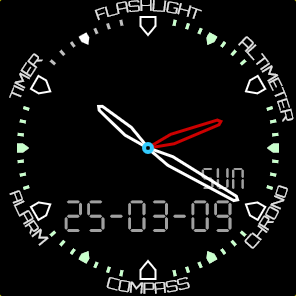
I named it <em>Ty-Touch</em> and its share code is: <code>NbQSVMrh</code><br/>
<br/></p>
</div>
<div class="paragraph">
<figure class="figure text-center w-100">
    <img src="/images/blog/ty-touch.png" class="figure-img img-fluid rounded w-50" alt="Ty-Touch Face Screenshot" />
    <figcaption class="figure-caption">The Ty-Touch Face</figcaption>
</figure>

</div>
<div class="paragraph">
<p><br/></p>
</div>
<div class="sect1">
<h2 id="_making_of">Making Of</h2>
<div class="sectionbody">
<div class="paragraph">
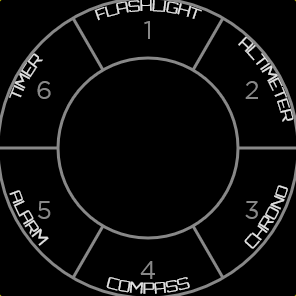
<p>Ty-Touch uses the Launcher Facelet in <code>Pie 6</code> Mode, which creates 6 segments. The outer and inner launcher diameter is selectable, but the inner diameter should not get to small, cause a long press on the inner circle is reserved by the OS to open the face chooser and config.<br/>
<figure class="figure text-center w-100">
    <img src="/images/blog/ty-touch-launcher.png" class="figure-img img-fluid rounded w-50" alt="Ty-Touch 6 Segment Launcher Screenshot" />
    <figcaption class="figure-caption">Ty-Touch 6 Segment Launcher</figcaption>
</figure>

In the Launcher settings you can select the tap time, acknowledge behavior etc.<br/>
Have a look at the segment actions and how they trigger a Value Provider to display the altitude and the compass temporary. Its pretty simple.<br/>
The outer text consists of a Round Text Facelet using the &#39;Text Angle Format&#39;.<br/>
For a basic clock display, I like using the Clock Facelet, cause it has some handy features out of the box, like activating hand transparency on a center tap, an alarm hand showing up when an alarm is active and an integrated ticks gauge, which I used for the battery level in light green here.<br/></p>
</div>
<div class="paragraph">
<p>Just copy this face and customize your personal data like weather or body info in the upper free space.</p>
</div>
<div class="paragraph text-end small">
<p>© Hero Image of Tissot</p>
</div>
</div>
</div>
]]>
    </content>
  </entry>
  
  <entry>
    
    <author>
      <name>Marco Paland</name>
    </author>
    
    <id>tag:www.tyckr.io,2025:/blog/2025-02-27-release-watchface-3.8.1/</id>
    <link rel="alternate" href="https://www.tyckr.io/blog/2025-02-27-release-watchface-3.8.1/"/>
    <title>Watchface 3.8.1 released</title>
    <published>2025-02-27T00:00:00+00:00</published>
    <updated>2025-02-27T00:00:00+00:00</updated>
    <summary type="text">Release of Watchface 3.8.1 / Core 3.14.0</summary>
    <content type="html" xml:base="https://www.tyckr.io/" xml:lang="en">
      <![CDATA[<div class="paragraph">
<p>We are really happy to announce the release of the latest Watchface 3.8.1, which contains an update of the core to version <code>3.14.0</code> with the following changes:</p>
</div>
<div class="ulist">
<ul>
<li>
<p>Added a Triangle-Rectangle shape to the Ticks Facelet</p>
</li>
<li>
<p>Refactored the counting modes of the Value Provider to be more intuitive</p>
</li>
<li>
<p>Improved the Burn-In protection rendering, this is starting after being 2 minutes in ambient mode now</p>
</li>
</ul>
</div>
<div class="paragraph">
<p>The latest version <code>3.8.1</code> of the watchface is now available in the <a href="https://play.google.com/store/apps/details?id=com.paland.watchface.tyckr">Google Play Store</a> or for direct APK <a href="/download/">download</a>.</p>
</div>
]]>
    </content>
  </entry>
  
  <entry>
    
    <author>
      <name>Marco Paland</name>
    </author>
    
    <id>tag:www.tyckr.io,2025:/blog/2025-02-24-release-watchface-3.7.0/</id>
    <link rel="alternate" href="https://www.tyckr.io/blog/2025-02-24-release-watchface-3.7.0/"/>
    <title>Watchface 3.7.0 released</title>
    <published>2025-02-24T00:00:00+00:00</published>
    <updated>2025-02-24T00:00:00+00:00</updated>
    <summary type="text">Release of Watchface 3.7.0 / Core 3.13.0</summary>
    <content type="html" xml:base="https://www.tyckr.io/" xml:lang="en">
      <![CDATA[<div class="paragraph">
<p>Watchface 3.7.0 is mainly an update of the core to version <code>3.13.0</code> which contains the following changes:</p>
</div>
<div class="ulist">
<ul>
<li>
<p>Fixed Timeseries and forecast data handling of the Weather Provider</p>
</li>
<li>
<p>Added the convenience constant <code>sec</code> to the expression parser to get the actual seconds</p>
</li>
<li>
<p>Optimized the rendering of the circular and linear Marker Facelet</p>
</li>
<li>
<p>Improved the empty date handling of the Solar, Lunar and Prayer Provider</p>
</li>
</ul>
</div>
<div class="paragraph">
<p>The latest version <code>3.7.0</code> of the watchface is now available in the <a href="https://play.google.com/store/apps/details?id=com.paland.watchface.tyckr">Google Play Store</a> or for direct APK <a href="/download/">download</a>.</p>
</div>
]]>
    </content>
  </entry>
  
  <entry>
    
    <author>
      <name>Marco Paland</name>
    </author>
    
    <id>tag:www.tyckr.io,2025:/blog/2025-02-03-release-watchface-3.6.0/</id>
    <link rel="alternate" href="https://www.tyckr.io/blog/2025-02-03-release-watchface-3.6.0/"/>
    <title>Watchface 3.6.0 released</title>
    <published>2025-02-03T00:00:00+00:00</published>
    <updated>2025-02-03T00:00:00+00:00</updated>
    <summary type="text">Release of Watchface 3.6.0 with improved permission handling and Core 3.12.0 featuring a faster video grabber, new Shape Facelet, and Hand Facelet enhancements.</summary>
    <content type="html" xml:base="https://www.tyckr.io/" xml:lang="en">
      <![CDATA[<div class="paragraph">
<p>This release contains mainly an updated core and gives an improved permission handling experience.<br/>
The core has been updated to version <code>3.12.0</code> which contains the following changes:</p>
</div>
<div class="ulist">
<ul>
<li>
<p>Replaced the video grabber library (used by the Image/Video Facelet) with an own implementation, which is way faster and has a much smaller footprint.</p>
</li>
<li>
<p>Added the Shape Facelet for dynamic shape drawing</p>
</li>
<li>
<p>Added an optional center dot to the Hand Facelet</p>
</li>
</ul>
</div>
<div class="paragraph">
<p>Watchface <code>3.6.0</code> contains the following changes:</p>
</div>
<div class="ulist">
<ul>
<li>
<p>Improved permission handling, all missing permissions will be displayed for a specific face at its start</p>
</li>
<li>
<p>Fixed the internal Flashlight activity of the Launcher Facelet</p>
</li>
</ul>
</div>
<div class="paragraph">
<p>The latest version <code>3.6.0</code> of the watchface is now available in the Play Store or for direct APK <a href="/download/">download</a>.</p>
</div>
]]>
    </content>
  </entry>
  
  <entry>
    
    <author>
      <name>Marco Paland</name>
    </author>
    
    <id>tag:www.tyckr.io,2025:/blog/2025-01-24-release-watchface-3.5.0/</id>
    <link rel="alternate" href="https://www.tyckr.io/blog/2025-01-24-release-watchface-3.5.0/"/>
    <title>Watchface 3.5.0 released</title>
    <published>2025-01-24T00:00:00+00:00</published>
    <updated>2025-01-24T00:00:00+00:00</updated>
    <summary type="text">Release of Watchface 3.5.0 with Core 3.11.0 featuring a new Tinos serif font, improved Clock Facelet anti-aliasing, and GPS time source permission fixes.</summary>
    <content type="html" xml:base="https://www.tyckr.io/" xml:lang="en">
      <![CDATA[<div class="paragraph">
<p>Release of Watchface 3.5.0 with Core 3.11.0 featuring a new Tinos serif font, improved Clock Facelet anti-aliasing, and GPS time source permission fixes.</p>
</div>
<div class="paragraph">
<p>The core has been updated to version <code>3.11.0</code> which contains the following changes:</p>
</div>
<div class="ulist">
<ul>
<li>
<p>Added a new serif font &#34;Tinos&#34;</p>
</li>
<li>
<p>Fixed border anti aliasing of the Clock Facelet</p>
</li>
<li>
<p>Fixed the permission check of the Time Provider when using GPS as time source</p>
</li>
</ul>
</div>
<div class="paragraph">
<p>The latest version <code>3.5.0</code> of the watchface is now available in the Play Store or for direct APK <a href="/download/">download</a>.</p>
</div>
]]>
    </content>
  </entry>
  
  <entry>
    
    <author>
      <name>Marco Paland</name>
    </author>
    
    <id>tag:www.tyckr.io,2025:/blog/2025-01-22-release-watchface-3.4.13/</id>
    <link rel="alternate" href="https://www.tyckr.io/blog/2025-01-22-release-watchface-3.4.13/"/>
    <title>First Public Release of the Android tyckr watch face</title>
    <published>2025-01-22T00:00:00+00:00</published>
    <updated>2025-01-22T00:00:00+00:00</updated>
    <summary type="text">Release of Watchface 3.4.13 / Core 3.9.4</summary>
    <content type="html" xml:base="https://www.tyckr.io/" xml:lang="en">
      <![CDATA[<div class="paragraph">
<p>We are thrilled and proud to introduce the latest version of the tyckr watchface after two years of intensive development and closed testing.<br/>
The Watchface is composed of two main components:</p>
</div>
<div class="ulist">
<ul>
<li>
<p>The Watchface, which handles the user interface, permission requests and runtime environment.</p>
</li>
<li>
<p>The Core Logic, which manages data capturing, processing and rendering. This is shared among all tyckr projects (Watchface, Widget, App).</p>
</li>
</ul>
</div>
<div class="paragraph">
<p>In this latest version of the Core, we have updated the magnetic declination calculation model to the latest <a href="https://www.ncei.noaa.gov/news/world-magnetic-model-2025-released">World Magnetic Model 2025</a>, which is used by the Navigation Provider to enhance accuracy.</p>
</div>
<div class="paragraph">
<p>The latest version <code>3.4.13</code> of the watchface is now available in the Google Play Store or as a direct APK from our <a href="/download/">Download page</a>.</p>
</div>
]]>
    </content>
  </entry>
  
  <entry>
    
    <author>
      <name>Marco Paland</name>
    </author>
    
    <id>tag:www.tyckr.io,2025:/blog/2025-01-13-video-surveillance/</id>
    <link rel="alternate" href="https://www.tyckr.io/blog/2025-01-13-video-surveillance/"/>
    <title>Creating a Video Surveillance Face</title>
    <published>2025-01-13T00:00:00+00:00</published>
    <updated>2025-01-13T00:00:00+00:00</updated>
    <summary type="text">How to Monitor Video and IP Cameras on Your Watch or Widget out of the box</summary>
    <content type="html" xml:base="https://www.tyckr.io/" xml:lang="en">
      <![CDATA[<div class="paragraph">
<p>Video surveillance or TV on your wrist? Yes, it’s possible with tyckr! Let’s create a face that displays live camera feeds directly on your watch, giving you an instant view of what’s happening at home, your office, in the pet’s cage, on TV or at any location with IP cameras.<br/>
<br/></p>
</div>
<div class="sect1">
<h2 id="_getting_started">Getting Started</h2>
<div class="sectionbody">
<div class="paragraph">
<p>This is a really short &#34;how to&#34; tutorial, because all functionality is supported right out of the box.<br/>
Tyckr’s Image / Video Facelet allows you to render video stream stills at given interval times as an image snapshot. This is perfect for monitoring security cameras, baby monitors, or any IP camera with accessible video streams.<br/>
<br/></p>
</div>
</div>
</div>
<div class="sect1">
<h2 id="_push_notifications_for_motion_detection">Push Notifications for Motion Detection</h2>
<div class="sectionbody">
<div class="paragraph">
<p>Many modern IP cameras have motion detection or body recognition and can initiate a HTTP API request in case of a motion event.<br/>
Setting up the tyckr <a href="/message/">Push Notification API</a> as HTTP request sends a push notification directly to the watch, to inform the user instantly and reliable.<br/>
<br/></p>
</div>
</div>
</div>
<div class="sect1">
<h2 id="_further_enhancements">Further Enhancements</h2>
<div class="sectionbody">
<div class="ulist">
<ul>
<li>
<p>Use geofencing to automatically activate the video surveillance when you leave home</p>
</li>
<li>
<p>Add an online checker to monitor if your camera is online</p>
</li>
</ul>
</div>
<div class="paragraph">
<p><br/></p>
</div>
<div class="paragraph">
<p>Happy monitoring!</p>
</div>
</div>
</div>
]]>
    </content>
  </entry>
  
  <entry>
    
    <author>
      <name>Marco Paland</name>
    </author>
    
    <id>tag:www.tyckr.io,2024:/blog/2024-12-10-finding-the-qibla/</id>
    <link rel="alternate" href="https://www.tyckr.io/blog/2024-12-10-finding-the-qibla/"/>
    <title>Finding the Qibla to the Kaaba in Mecca</title>
    <published>2024-12-10T00:00:00+00:00</published>
    <updated>2024-12-10T00:00:00+00:00</updated>
    <summary type="text">About creating a Mecca Finder as Watch face or Widget using tyckr</summary>
    <content type="html" xml:base="https://www.tyckr.io/" xml:lang="en">
      <![CDATA[<div class="paragraph">
<p>The qibla (Arabic: قِبْلَة, lit. &#39;direction&#39;) is the direction towards the Kaaba in the Sacred Mosque in Mecca, which is used by Muslims in various religious contexts, particularly the direction of prayer for the salah.
The most common technical definition used by Muslim astronomers is the direction on the great circle in the Earth’s Sphere passing through the actual location and the Kaaba, giving the direction of the shortest possible path between the two.<br/>
To implement a mobile finder, we need the actual location, the Kaaba location and an exact compass direction to calculate the qibla.<br/></p>
</div>
<div class="paragraph">
<p>To implement this in tyckr as a widget or watch face, we take the Location Provider to get the actual location, the Orientation Provider for the compass direction and the Navigation Provider to calculate the distance (just nice to know) and the bearing.</p>
</div>
<div class="sect1">
<h2 id="_behind_the_scenes">Behind the Scenes</h2>
<div class="sectionbody">
<div class="paragraph">
<p>The Navigation Provider calculates various navigation data between two GPS coordinates, including the distance and bearing between two points on a sphere given their longitudes and latitudes by using the haversine formula.<br/>
As the GPS coordinates are referring to true north, the bearing needs to be converted to magnetic north to get the accurate direction. This is done by the Orientation Provider using the WMM2025 model, which provides the magnetic declination for a given location and time.<br/>
However, the precision depends completely on the quality of the integrated compass.</p>
</div>
<div class="paragraph">
<p>While developing the idea of the Qibla Finder, the idea of calculating prayer times came up. Muslim prayer times are based on the position of the sun, the earth and the actual position on it.<br/>
We wanted to create a really high precision prayer time calculation, so we are using the astronomical algorithms of Jean Meeus.</p>
</div>
</div>
</div>
<div class="sect1">
<h2 id="_creating_the_face">Creating the Face</h2>
<div class="sectionbody">
<div class="paragraph">
<p>Video is coming up soon. Stay tuned!</p>
</div>
</div>
</div>
]]>
    </content>
  </entry>
  
  <entry>
    
    <author>
      <name>Marco Paland</name>
    </author>
    
    <id>tag:www.tyckr.io,2024:/blog/2024-11-15-wff-format/</id>
    <link rel="alternate" href="https://www.tyckr.io/blog/2024-11-15-wff-format/"/>
    <title>Android WFF - The Good, the Bad and the Ugly</title>
    <published>2024-11-15T00:00:00+00:00</published>
    <updated>2024-11-15T00:00:00+00:00</updated>
    <summary type="text">An analysis of Google&#39;s new Android Watch Face Format (WFF), discussing its benefits for GPU rendering and battery life, while highlighting concerns about backwards compatibility and serious watch face limitations</summary>
    <content type="html" xml:base="https://www.tyckr.io/" xml:lang="en">
      <![CDATA[<div class="paragraph">
<p>Last year Google announced in cooperation with Samsung the new Android Watch-Face-Format, a declarative XML format without ANY code to describe the entire watchface functionality.<br/>
<br/></p>
</div>
<div class="sect1">
<h2 id="_the_good">The Good</h2>
<div class="sectionbody">
<div class="paragraph">
<p>Despite of a lot of complains in the developer community, the introduction of a code free watchface format is a big and necessary step in the right direction.<br/>
Why that?<br/>
Because all the heavy rendering calculations can be offloaded to a powerful and energy efficient GPU.<br/>
Apple is doing the same on their watches since the beginning.<br/>
When it comes to rendering a watchface by code, there is a lot of bad, there are <strong>a lot</strong> of inefficient, sluggish, slow and battery draining watch faces out there, so having a kind of declarative format is a really good thing.</p>
</div>
</div>
</div>
<div class="sect1">
<h2 id="_the_bad">The Bad</h2>
<div class="sectionbody">
<div class="paragraph">
<p>A lot of watch faces out there <strong>need</strong> code to work properly. Think about a watchface which processes weather or health data and displays it in a fancy way.<br/>
The new WFF is codeless, all coded functions should be organized as complication data providers which need to be installed separately.</p>
</div>
</div>
</div>
<div class="sect1">
<h2 id="_the_ugly">The Ugly</h2>
<div class="sectionbody">
<div class="paragraph">
<p>Watches, like the new Google Pixel 3 or Samsung’s Galaxy Watch Ultra, which have Wear OS 5 preinstalled are not able to use the old watchface format anymore. Yeah, hard to believe.
All old non WFF watch faces are not listed in the PlayStore on theses watches either.
Even worse, on latest watches like Googles Pixel 3, the whole runtime environment for old faces is missing - and other watches will do the same later on.
<br/></p>
</div>
</div>
</div>
<div class="sect1">
<h2 id="_whats_next">What’s next?</h2>
<div class="sectionbody">
<div class="paragraph">
<p>On the time of writing, its still possible to install old watch faces via an an app called <a href="https://play.google.com/store/apps/details?id=org.freepoc.wearinstaller2&amp;hl=en">Wear Installer 2</a> on OS 5 watches.
<br/></p>
</div>
</div>
</div>
<div class="sect1">
<h2 id="_samsung_google_please_help_us">Samsung, Google, please help us!</h2>
<div class="sectionbody">
<div class="paragraph">
<p>Personally, I think this step is and was way too radical, cutting off an colorful, creative, highly customizable ecosystem.
Why don’t mark WFF watch faces in the store with a green star and let them coexist with the older format? Let the user decide.<br/>
At least give the opportunity to install a watch face service from the store if the user want and need it.</p>
</div>
</div>
</div>
]]>
    </content>
  </entry>
  
  <entry>
    
    <author>
      <name>Marco Paland</name>
    </author>
    
    <id>tag:www.tyckr.io,2024:/blog/2024-10-10-the-24h-clock/</id>
    <link rel="alternate" href="https://www.tyckr.io/blog/2024-10-10-the-24h-clock/"/>
    <title>Designing a 24-Hour Clock</title>
    <published>2024-10-10T00:00:00+00:00</published>
    <updated>2024-10-10T00:00:00+00:00</updated>
    <summary type="text">Explore the design and functionality of a 24-hour analog clock, featuring day/night visualization and solar time integration. Learn about the historical significance, practical benefits, and aesthetic appeal of the 24-hour time format.</summary>
    <content type="html" xml:base="https://www.tyckr.io/" xml:lang="en">
      <![CDATA[<div class="paragraph">
<p>The 24-hour clock has a rich history, with roots tracing back to ancient civilizations. The Egyptians used a similar system, and the concept evolved over centuries, finding its way into the military and later into civilian life. This historical continuity adds depth to its beauty, connecting us to a long tradition of human ingenuity.</p>
</div>
<div class="paragraph">
<figure class="figure text-center w-100">
    <img src="https://upload.wikimedia.org/wikipedia/commons/thumb/0/0e/Clock_24_J.jpg/605px-Clock_24_J.jpg" class="figure-img img-fluid rounded w-50" alt="24-hour clock in Venice" />
    <figcaption class="figure-caption">The 24-hour tower clock in Venice that lists hours 1 to 12 twice</figcaption>
</figure>

</div>
<div class="paragraph">
<p>While the 12-hour clock remains entrenched in our everyday lives, embracing the 24-hour clock can offer a refreshing change.<br/>
Whether for its clarity, efficiency, or sheer elegance, the 24-hour clock is a timeless tool that deserves appreciation.
<br/></p>
</div>
<div class="sect1">
<h2 id="_clarity_and_precision">Clarity and Precision</h2>
<div class="sectionbody">
<div class="paragraph">
<p>One of the most compelling features of the 24-hour clock is its clarity. Unlike the 12-hour format, which requires a distinction between AM and PM, the 24-hour clock leaves no room for ambiguity. When you see “14:00,” you know it’s 2 PM without any further thought. This precision is not only crucial for military operations but also invaluable in fields like aviation, computing and international communications.<br/></p>
</div>
<div class="paragraph">
<figure class="figure text-center w-100">
    <img src="/images/blog/24_hour_clock_uss_midway.jpg" class="figure-img img-fluid rounded w-50" alt="24-hour clock USS Midway" />
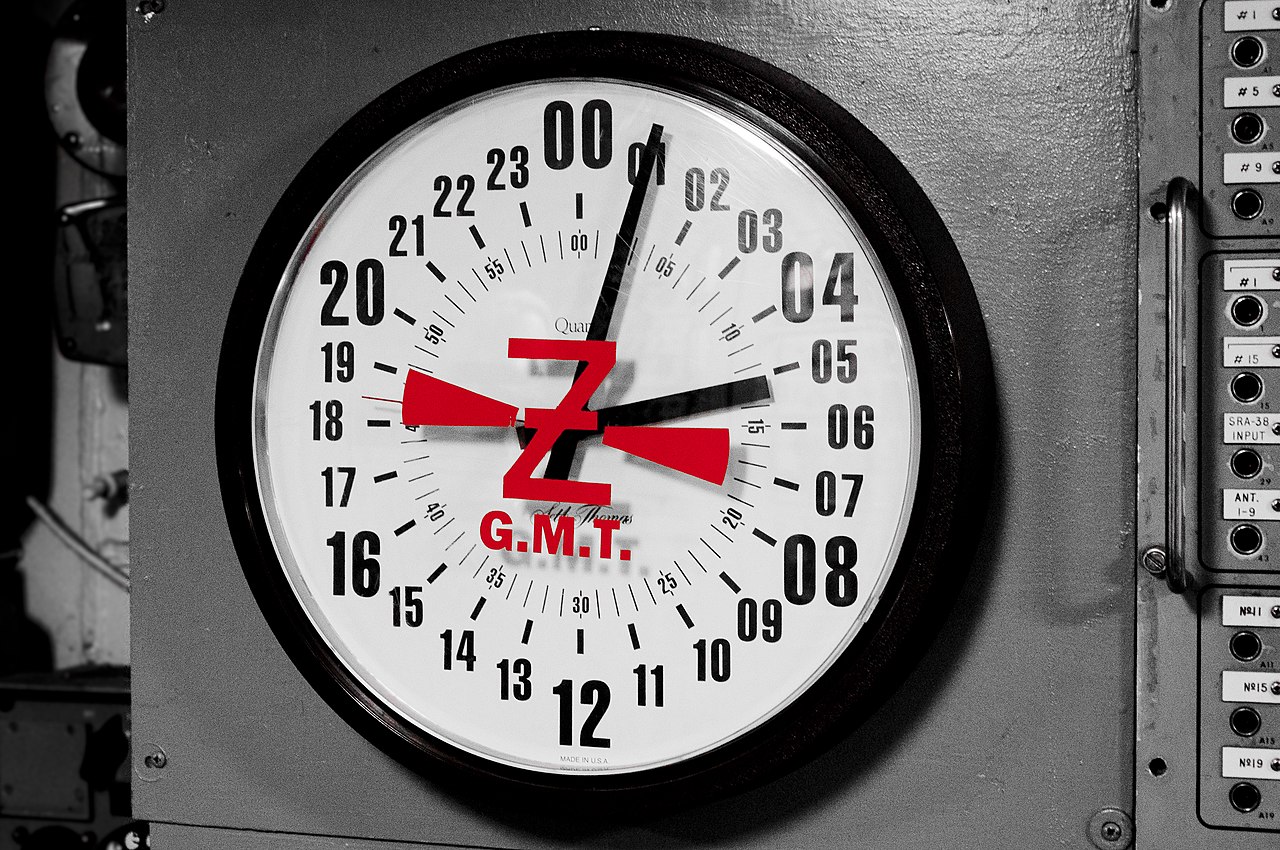
    <figcaption class="figure-caption">24-hour GMT clock as seen on the USS Midway</figcaption>
</figure>

</div>
<div class="paragraph">
<p>The 24-hour format has become a universal language of time. It transcends borders and languages, providing a consistent method of timekeeping that can be understood by people from all over the world. This global standardization is particularly beneficial in our interconnected age, where coordination across time zones is an everyday necessity. Our planet operates on a roughly 24-hour cycle, and the 24-hour clock mirrors this natural rhythm. It divides the day into a continuous stream of hours, from midnight to midnight, seamlessly aligning with the Earth’s rotation.<br/>
This inherent harmony between human timekeeping and the natural world is both practical and poetic. Another advantage is slow speed of the hour hand which runs at half the speed of a 12-hour clock which may reduce the personal stress level.
<br/></p>
</div>
</div>
</div>
<div class="sect1">
<h2 id="_designing_a_24_hour_analogue_watch">Designing a 24-hour Analogue Watch</h2>
<div class="sectionbody">
<div class="paragraph">
<p>There’s an undeniable aesthetic appeal in the straightforwardness of the 24-hour clock. It embodies a minimalist philosophy: no frills, just the essentials. This simplicity is not only functional but also visually pleasing, a clean and elegant representation of time.<br/></p>
</div>
<div class="paragraph">
<p>Using the Clock Facelet makes is very simple to build a 24-hour watch, just select one of the <code>24-Hour-Top</code> or <code>24-Hour-Bottom</code> Hour modes and adjust the dial accordingly.<br/>
<code>24-Hour-Top</code> places the zero hour on top (12 o’clock position) as seen on the GMT clock above, while <code>24-Hour-Bottom</code> sets the zero hour to the bottom (6 o’clock position). It’s a matter of personal style and the application field which mode to choose.<br/>
For me, it’s more intuitive to have the zero hour at the bottom, similar to the famous <a href="https://www.botta-design.de">BOTTA UNO 24</a> watch, which takes it even further by omitting the minute hand.<br/>
Another advantage of this style is its correlation to the sun’s position, placing noon at the 12 o’clock position.</p>
</div>
<div class="paragraph">
<p>That being said, we use the Solar Times Provider to obtain actual location based sunrise and sunset times and a Pie Facelet which uses the converted times as start and stop angle. When the hour hand in inside the pie area, it indicates daytime. This creates a nice visual representation of the day/night ratio.<br/></p>
</div>
<div class="paragraph">
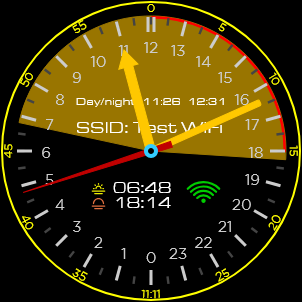
<p>This is what the 24-hour face looks like:</p>
</div>
<div class="paragraph">
<figure class="figure text-center w-100">
    <img src="/images/blog/24-hour-face.png" class="figure-img img-fluid rounded w-50" alt="24-hour Face" />
    <figcaption class="figure-caption">The 24-hour Face</figcaption>
</figure>

</div>
<div class="paragraph">
<p>The clock’s center dot displays the actual state of the Time Provider. Additionally, the actual day/night times and the WiFi connection status are displayed.<br/></p>
</div>
<div class="paragraph">
<p>The share code is: <code>iSkaU6bm</code><br/></p>
</div>
<div class="paragraph">
<p>Copy this face, customize colors and enhance it with additional solar or lunar data you like to see!</p>
</div>
</div>
</div>
]]>
    </content>
  </entry>
  
  <entry>
    
    <author>
      <name>Marco Paland</name>
    </author>
    
    <id>tag:www.tyckr.io,2024:/blog/getting-started/</id>
    <link rel="alternate" href="https://www.tyckr.io/blog/getting-started/"/>
    <title>Installing and Setting Up tyckr - A Beginner&#39;s Guide</title>
    <published>2024-09-30T00:00:00+00:00</published>
    <updated>2024-09-30T00:00:00+00:00</updated>
    <summary type="text">Step-by-step guide for first-time installation and setup of tyckr watchface and widget. Learn how to register your device and create your first custom face.</summary>
    <content type="html" xml:base="https://www.tyckr.io/" xml:lang="en">
      <![CDATA[<div class="paragraph">
<p>This is a short guide to get you up and running tyckr for the first time.<br/></p>
</div>
<div class="paragraph">
<p><br/></p>
</div>
<div class="sect1">
<h2 id="_watch_face_installation">Watch Face Installation</h2>
<div class="sectionbody">
<div class="paragraph">
<p>To install tyckr as a watch face use the Play Store on your watch and search for &#34;tyckr&#34;.</p>
</div>
<div class="admonitionblock tip">
<table>
<tbody><tr>
<td class="icon">
<div class="title">Tip</div>
</td>
<td class="content">
Android Wear OS 5 watches can only install codeless WFF watch faces over the Play Store. To install tyckr on OS 5, use the <a href="https://play.google.com/store/apps/details?id=org.freepoc.wearinstaller2&amp;hl=en">Wear Installer 2</a> and install the APK on the <a href="/download/">Download</a> Page.<br/>
On newer Wear OS 5 devices the watch face runtime service is completely removed, so the old watch faces do not work at all. See the Wear OS App Installation below.
</td>
</tr>
</tbody></table>
</div>
<div class="paragraph">
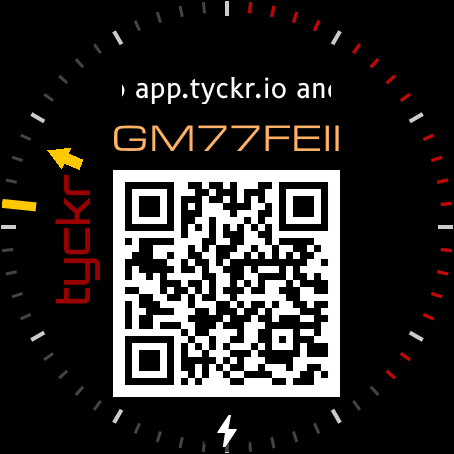
<p>After the installation, you can start the tyckr watchface by selecting it in the watchface settings, you see the following screen:</p>
</div>
<div class="paragraph">
<figure class="figure text-center w-100">
    <img src="/images/blog/watch-registration.png" class="figure-img img-fluid rounded w-50" alt="Initial tyckr screen on a new Smartwatch" />
    <figcaption class="figure-caption">Initial tyckr on a new Smartwatch</figcaption>
</figure>

</div>
<div class="paragraph">
<p>Open the tyckr Editor App on your phone/browser at <a href="https://edit.tyckr.io">edit.tyckr.io</a> and login by a service provider (Google, Microsoft, Github) or create a Mail account. It’s a PWA so you can install the Editor right on the Home Screen.<br/>
After a successful login, goto &#34;My Devices&#34; and press the green &#34;+&#34; button in the right bottom corner.<br/>
You can enter the tyckr ID shown on the watch or simply scan the QR code.<br/></p>
</div>
<div class="paragraph">
<p>Your watch is now registered and you can start to <em>Create your first Face</em> in the section below.</p>
</div>
<div class="paragraph">
<p><br/></p>
</div>
</div>
</div>
<div class="sect1">
<h2 id="_wear_os_app_installation">Wear OS App Installation</h2>
<div class="sectionbody">
<div class="paragraph">
<p>To install tyckr as a Wear OS App on Wear OS 5 (and above) devices, use the Play Store on your watch and search for &#34;tyckr&#34;.</p>
</div>
<div class="paragraph">
<p>Open the tyckr Editor App on your phone/browser at <a href="https://edit.tyckr.io">edit.tyckr.io</a> and login by a service provider (Google, Microsoft, Github) or create a Mail account. It’s a PWA so you can install the Editor right on the Home Screen.<br/>
After a successful login, goto &#34;My Devices&#34; and press the green &#34;+&#34; button in the right bottom corner.<br/>
You can enter the tyckr ID shown on the watch or simply scan the QR code.<br/></p>
</div>
<div class="paragraph">
<p>Your watch is now registered and you can start to <em>Create your first Face</em> in the section below.</p>
</div>
<div class="paragraph">
<p><br/></p>
</div>
</div>
</div>
<div class="sect1">
<h2 id="_widget_installation">Widget Installation</h2>
<div class="sectionbody">
<div class="paragraph">
<p>To install tyckr as a widget use the Play Store on your phone or tablet and search for &#34;tyckr&#34;.<br/>
Alternatively, if the Play Store is not available, you can download the APK on the <a href="/download/">Download Page</a> and install it directly on your device.<br/></p>
</div>
<div class="paragraph">
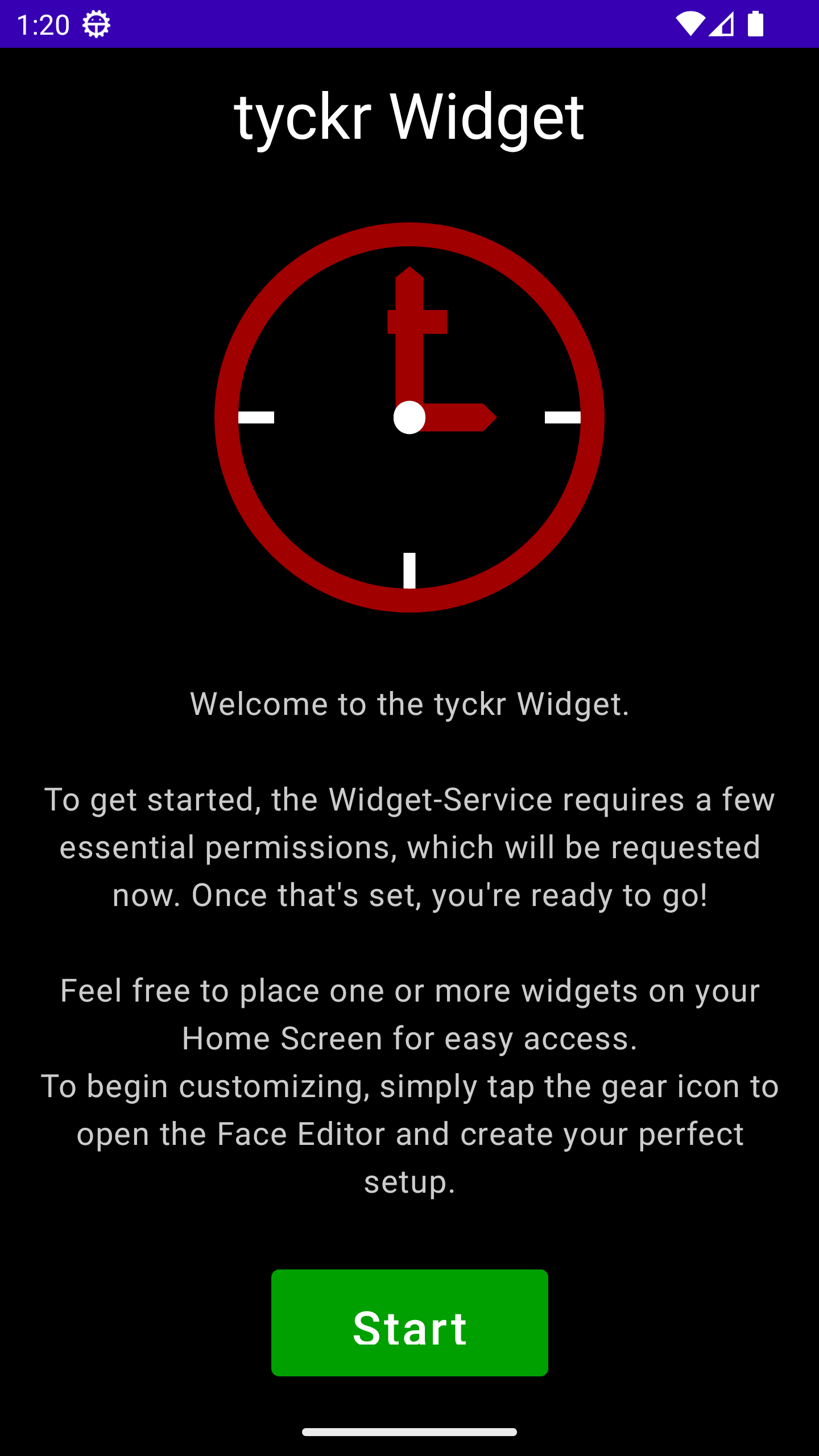
<p>Start the initial setup by opening the tyckr App for the first time by tapping the app icon or selecting <em>Open</em> after installation.<br/></p>
</div>
<div class="paragraph">
<figure class="figure text-center w-100">
    <img src="/images/blog/widget-start-activity.png" class="figure-img img-fluid rounded w-50" alt="Start Screen after installation" />
    <figcaption class="figure-caption">Start Screen after installation</figcaption>
</figure>

</div>
<div class="paragraph">
<p>To enable the tyckr widget service, you need to grant a few mandatory permissions, particularly location access.<br/>
As tyckr runs as a background service, it requires these permissions to function correctly, even if location services are not actively used.<br/>
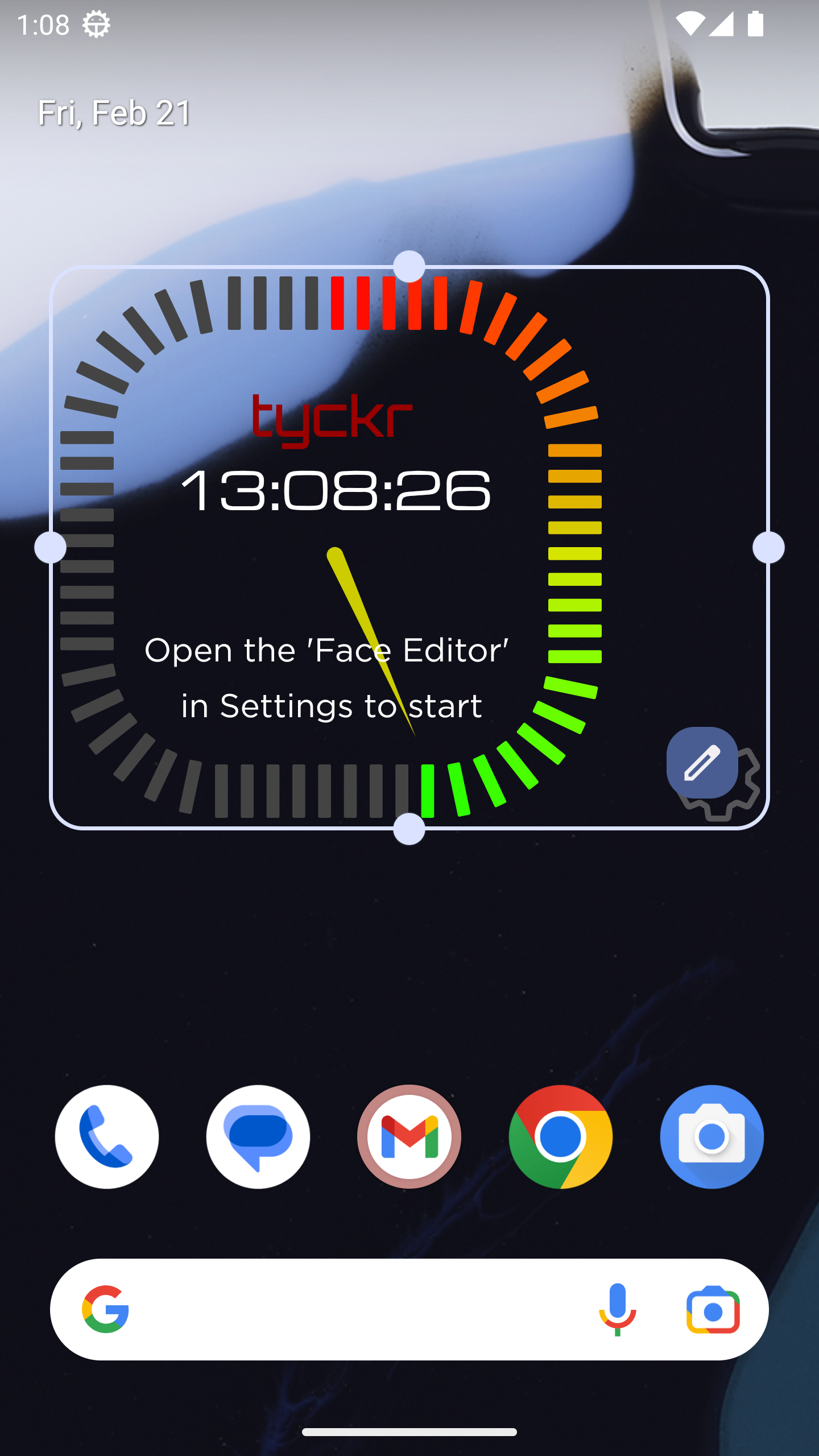
Once all permissions are set, add the initial widget to your Home Screen:</p>
</div>
<div class="paragraph">
<figure class="figure text-center w-100">
    <img src="/images/blog/widget-resize2.png" class="figure-img img-fluid rounded w-50" alt="Resize the Widget" />
    <figcaption class="figure-caption">Resize the Widget</figcaption>
</figure>

</div>
<div class="paragraph">
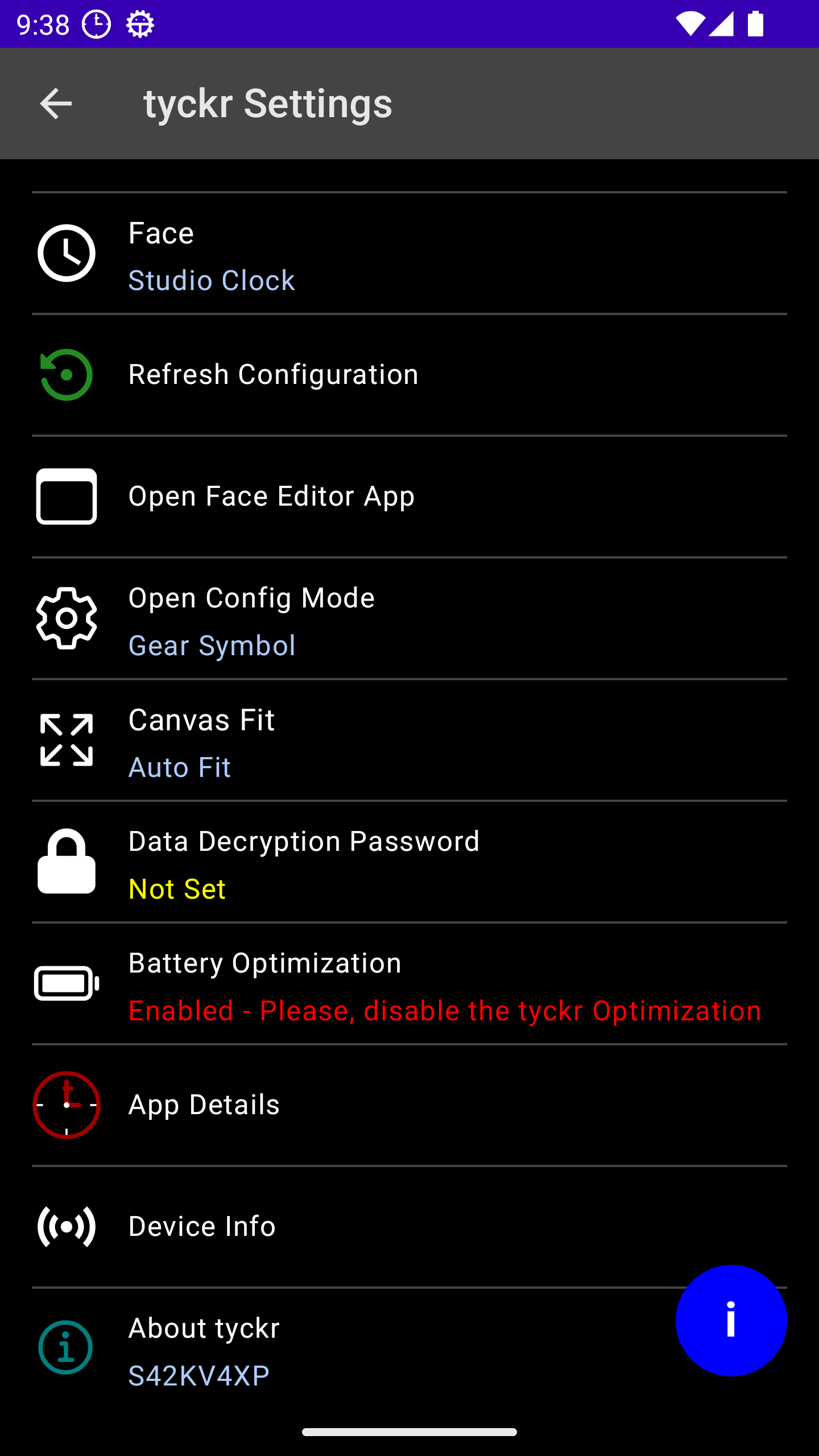
<p>Tap the &#34;Gear&#34; button to open the Settings screen, alternatively you can tap the app icon to do the same:<br/></p>
</div>
<div class="paragraph">
<figure class="figure text-center w-100">
    <img src="/images/blog/widget-settings-start.png" class="figure-img img-fluid rounded w-50" alt="Setting Screen of the Widget" />
    <figcaption class="figure-caption">Settings Screen</figcaption>
</figure>

</div>
<div class="paragraph">
<p>The code displayed beneath <em>About tyckr</em> is the TID (tyckr ID). It’s a unique identifier which references your device and is required for sending <a href="/message/">Push Messages</a> to it.<br/>
Tapping the blue info button provides help with the options.<br/></p>
</div>
<div class="paragraph">
<p>Tab <em>Open Face Editor App</em> to start creating and editing your first face.<br/>
The Face Editor App <a href="https://edit.tyckr.io">edit.tyckr.io</a> is a Progressive Web App (PWA) and can be installed directly on the phone or tablet.<br/>
Log in with a service provider (Google, Microsoft, Github) or create a new Mail account.<br/></p>
</div>
<div class="paragraph">
<figure class="figure text-center w-100">
    <img src="/images/blog/widget-signin.png" class="figure-img img-fluid rounded w-50" alt="Sign-In Screen of the tyckr App" />
    <figcaption class="figure-caption">Sign In to the tyckr App</figcaption>
</figure>

</div>
<div class="paragraph">
<p>You are ready to <em>Create your first Face</em> now.<br/>
<br/></p>
</div>
</div>
</div>
<div class="sect1">
<h2 id="_create_your_first_face">Create your first Face</h2>
<div class="sectionbody">
<div class="paragraph">
<p>Creating a new face can be done from scratch or by copying a face from the pool of shared faces.</p>
</div>
</div>
</div>
]]>
    </content>
  </entry>
  
</feed>